 Casefile
Accessibility in Client Portals: A Guide for UK Mortgage Brokers
An accessible client portal is one that every applicant can sign in to, complete and track without help, whatever their disability, device, age or confidence with technology. For a mortgage broker, that matters in practical terms: every client who cannot upload a payslip on their own becomes a phone call, a chase and a delayed case. The sections below set out the barriers clients meet at each stage, the standards that define good practice, how to test a portal, and where a purpose-built platform such as Casefile takes work off a small brokerage.
TL;DR
- Accessibility means people with disabilities can perceive, understand, navigate and interact with your portal. All UK service providers must consider reasonable adjustments under the Equality Act 2010.
- Most friction sits in four places: login, forms, document upload and status messages.
- Automated scanners find only about 40% of issues, so combine them with manual checks and real users.
- Accessible design also reduces chasing: clients who finish tasks first time need fewer calls and reminders.
- Casefile gives brokerages a branded portal with self-building document lists and UK-only data residency, so you start from a platform designed for minimal technical learning.
Table of Contents
- What accessibility means for a client portal
- Where clients get stuck
- How to make each stage accessible
- A quick reference for brokers
- How to test your portal
- Why accessibility cuts workload
- Where Casefile fits
- Our perspective
- FAQ
- Sources
What accessibility means for a client portal
The W3C's Web Accessibility Initiative defines web accessibility as designing and developing websites, tools and technologies so that people with disabilities can perceive, understand, navigate and interact with them. The same page notes that accessible design improves overall user experience and satisfaction, particularly across devices and for older users.
In a mortgage setting, the "user" is an applicant who may be a first-time buyer on a phone, a self-employed client with a screen reader, an older remortgager who rarely uses online services, or a joint applicant who needs to upload documents from a different device. None of them chose your software. They simply need to prove their income and identity so the case can move.
The legal backdrop in the UK
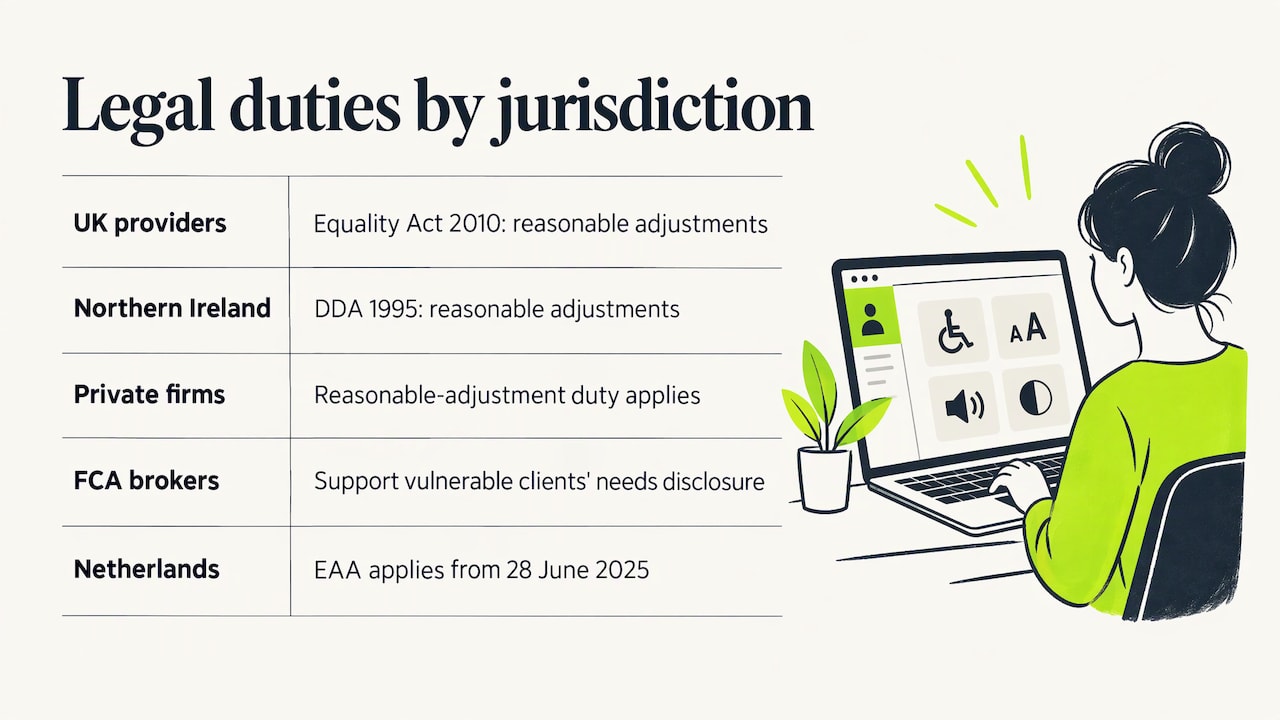
GOV.UK states that all UK service providers must consider reasonable adjustments for disabled people under the Equality Act 2010 (the Disability Discrimination Act 1995 in Northern Ireland). The page is written for public sector bodies, whose websites face additional accessibility regulations, but the reasonable adjustments duty it describes applies to private firms too. An example it gives is a client asking for information in an alternative format such as large print or audio.
For FCA-regulated brokers, there is a conduct angle as well. The FCA's guidance on the fair treatment of vulnerable customers says firms should set up systems and processes that support and enable vulnerable consumers to disclose their needs. A portal that clients can actually use is part of that picture. Your compliance adviser or network can tell you how it fits your firm's own obligations.
Outside the UK, rules are moving too. The Dutch regulator AFM states that from 28 June 2025 the European Accessibility Act applies to consumer banking services in the Netherlands, including login, electronic signatures and all client-facing communication. That is not a UK requirement, but it shows the direction of travel for financial services portals.
The standard behind it: WCAG 2.2
The benchmark most people use is the Web Content Accessibility Guidelines. WCAG 2.2 is now an international standard, ISO/IEC 40500 second edition (2025-09), with testable success criteria at levels A, AA and AAA that can be used in specifications, purchasing and contracts. Level AA is the usual target. When you assess any portal, yours or a supplier's, WCAG 2.2 AA gives you a common vocabulary.
For a broader plain-English overview of what website accessibility involves, this guide to website accessibility is a good starting point for small firms.
Where clients get stuck
Research on portals in other sectors shows the same pattern a broker sees in a live case: people fail early, at login, and fail again when asked to send something.
A usability study of a patient portal with 23 patients and 2 caregivers found that the most barriers occurred at the login step, mostly from difficulty typing URLs, usernames or passwords accurately. Participants with limited health literacy needed two extra minutes per task, and 69% of them hit basic computer barriers, against 10% of those with adequate literacy. The study is American and clinical, but a mortgage applicant typing a long link from an email faces the same task.
A 2025 study of a dental hospital portal in Australia tested 17 older and culturally and linguistically diverse patients. All logged in with a one-time passcode, yet 82% needed assistance, and copying and pasting the passcode on a smartphone was a recurring failure point. Only 18% managed to send a message to the clinic. The authors argue that plain-language labels, translation support and staff training matter as much as technical features for real uptake.
Translate that into broker terms and the friction points are:
- Signing in. Long links, one-time codes that cannot be pasted, timeouts that log people out mid-task.
- Forms. Unlabelled fields, errors shown only in red, required fields that are not marked.
- Uploading. Scanning a paper statement is hard for people with visual or physical disabilities, and phone photos are rejected or unreadable.
- Tracking. Clients cannot tell whether an upload worked or what is still outstanding, so they email or phone.
How to make each stage accessible
Login
Germany's federal accessibility guide, BFIT-Bund's design of user interface elements (version 9.02.2026, based on EN 301 549 v3.2.1), sets out concrete expectations that work well as a checklist:
- If a CAPTCHA is used during authentication, offer at least two different sensory options, such as visual and audio.
- Biometric login must have an alternative method.
- Automatic logout limits should be switchable off, extendable at least ten times, or extendable with a simple action at least 20 seconds before expiry.
- Login data should be savable or enterable from the clipboard or a password manager.
Washington State University's manual testing checklist adds the same point under WCAG 3.3.8: check that pasting is allowed in password fields, that password managers work, and that no puzzle or maths CAPTCHA is required without an alternative.
Forms and document lists
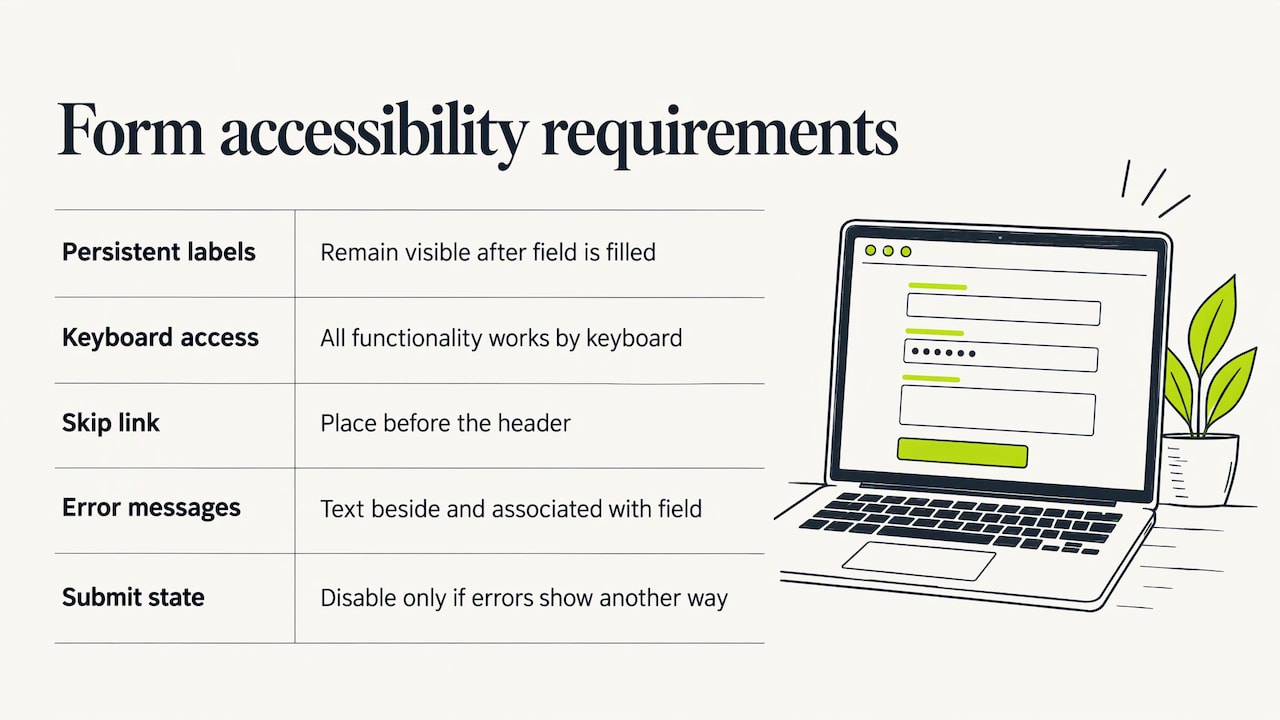
A document request is a form, and the same rules apply. Digital.gov's guidance for UX designers says forms need descriptive labels that remain visible after a field is filled, and that custom interactions should be tested with a screen reader and with keyboard only. It also recommends a "Skip to main content" link before the header for keyboard users.
On errors, Section508.gov's web design guide says an error must be described in text rather than by colour alone, ideally placed next to the field and associated with it so assistive technology announces it. All functionality must also work from the keyboard. The German guide adds that a submit button should not be disabled while a form is incomplete unless errors can be shown another way.
For a broker, the practical lesson is to ask clients for what they actually need to provide. A list built around the client's income type, such as employed, self-employed or contractor, removes the confusion of a generic checklist. If you design your own intake process, our guide to document intake forms for UK mortgage brokers covers the structure, and this overview of designing portal forms and submissions explains what a portal should include.
Document upload
The US Department of Labor's document uploader guidance is unusually specific, and its points transfer directly:
- Touch targets of at least 44 by 44 pixels and text of at least 16 pixels on small screens.
- Colour contrast of at least 4.5:1.
- Support for PDF, JPG, PNG, HEIC and TIFF files, using the standard file input so users can select, scan or photograph files.
- A confirmation page or automatic email so users know the upload worked.
The same page points out that scanning is not an accessible task for people with visual or physical disabilities, so an uploader needs to offer another route for people who cannot use it. In a brokerage, that route is a conversation with the adviser, and it should be recorded in the file like any other client need.
The confirmation point deserves emphasis. The Dutch regulator's reasoning is that accessibility covers every communication a client needs, because someone who can sign a contract but cannot read the confirmation email still cannot use the service independently. Make sure your upload receipts and reminder emails are plain, structured text. Our piece on mortgage client communication covers how to write updates that clients act on.
Status messages and tracking
BFIT-Bund classes error identification and status-message exposure as mandatory. In plain terms: when a document is received, rejected or still missing, that message must be readable by assistive technology and not just flash on screen. Say what is wrong and what to do next. "Page 3 of your March statement is missing" beats "Upload failed". For the broker's side of that problem, see missing bank statement pages.
A quick reference for brokers
| Stage | Common barrier | What good looks like |
|---|---|---|
| Login | Typing long URLs, unpastable codes, short timeouts | Paste allowed, password managers work, extendable session |
| Forms | Unlabelled fields, colour-only errors | Visible labels, text errors beside the field |
| Upload | Scanning, rejected phone photos | Camera upload, common file types, clear receipt |
| Tracking | No sign of what is outstanding | Plain-language status, accessible email updates |
| Support | No alternative route | Adviser contact for clients who cannot use the portal |
How to test your portal
No single check is enough. Three layers each reveal something different.
- Automated scans. Washington State University says automated scanners detect only about 40% of a page's issues. They are quick and good for missing labels and contrast, but incomplete.
- Manual checks. The W3C states that no automated tool alone can determine whether a site meets guidelines and that knowledgeable human evaluation is required. Walk through the portal with keyboard only, check focus is always visible, check target sizes (WCAG 2.5.8 sets a 24 by 24 CSS pixel minimum) and test paste in password fields.
- Real users. The W3C's guidance on involving users in evaluation says testing with disabled and older users finds issues that conformance checks miss, and that informal evaluation throughout development works better than a single formal test at the end. It cautions that one person's experience cannot be generalised to everyone with that or another disability, and that such tests should focus on barrier errors rather than time on task.
For a small brokerage, a realistic routine is a keyboard-only and phone walkthrough of the full journey whenever the portal changes, plus feedback from a few clients each quarter. Ask what stopped them, not whether they liked it.
Why accessibility cuts workload
The patient-portal authors conclude that onboarding should be tailored and accessible rather than one-size-fits-all, because the people with the least confidence need the most support at registration. Brokers will recognise this: the clients who struggle are the ones who generate the most chasing.
Accessible design is therefore not an extra on top of efficiency. A clear, labelled, mobile-friendly upload journey is the same journey that reduces abandoned requests. Our guide to client portal adoption looks at how brokers get clients to use a portal in the first place, and accessibility is a large part of that. Privacy belongs in the same conversation: clients are more willing to upload sensitive statements when they understand how they are handled, which our mortgage data privacy guide explains.
Where Casefile fits
Casefile is a cloud-based platform for UK mortgage brokers that automates document collection and review. Clients upload bank statements, payslips, tax forms, ID and utility bills through a portal that carries the brokerage's own branding. Document lists build themselves from the client's payment type, so applicants are asked only for what applies to them. The platform is designed to need minimal technical learning, and data stays in the UK.
For the reader of this article, that means a smaller brokerage can offer a clear, consistent client journey without building and maintaining a portal itself, while discrepancies such as undeclared commitments and mismatched wage deposits are flagged before they reach a lender.
To see how it works for your firm, visit Casefile, or read how Casefile handles your documents.

Our perspective
Most advice on portal accessibility is written for large organisations with design teams. A small brokerage has a different problem: an adviser who needs a case to move and a client who needs to know exactly what to send.
We build Casefile around that. Document lists build themselves from the client's payment type, so nobody is handed a generic checklist. The portal carries your branding, so the client recognises who is asking. We aim for minimal technical learning, because a client should not need instructions to upload a payslip.
We also think clear communication is part of access. Plain requests, clear statuses and an audit trail of what was asked and received help clients and advisers alike, and they keep the file in order for compliance. UK-only data residency and no manual or offshore handling of documents mean the people you ask for sensitive paperwork can trust where it goes.
Accessibility is never finished, and the sensible approach is steady: check the journey, listen to clients, fix what blocks them.
Darren
FAQ
Do UK mortgage brokers have to make their client portal accessible?
All UK service providers must consider reasonable adjustments for disabled people under the Equality Act 2010, according to GOV.UK. The more detailed public sector accessibility regulations are aimed at public bodies. Ask your compliance adviser how the duty applies to your firm.
Which standard should we use to judge a portal?
WCAG 2.2 at level AA is the common benchmark, and it is now published as the international standard ISO/IEC 40500. It gives you specific, testable criteria to check any portal against.
Is an automated accessibility scan enough?
No. Automated scanners detect only about 40% of issues, and the W3C says human evaluation is required. Combine a scan with keyboard-only and phone walkthroughs, and with feedback from real clients.
What should a client do if they cannot upload documents themselves?
They need another route, such as speaking to their adviser. Record the need in the client file and make sure the portal's receipts and reminders are readable in an accessible format.
Sources
- Introduction to Web Accessibility, W3C WAI
- Understanding accessibility requirements for public sector bodies, GOV.UK
- Guidance for firms on the fair treatment of vulnerable customers, FCA
- Toegankelijkheid (digitale) dienstverlening, AFM
- ISO/IEC 40500 second edition, 2025-09
- Online patient websites for electronic health record access, PMC
- Toward Normalizing patient portals, Journal of Medical Internet Research, 2025
- Accessible design of user interface elements, BFIT-Bund
- WCAG 2.2 Manual Testing Checklist, Washington State University
- Accessibility for user experience designers, Digital.gov
- Guide to Accessible Web Design and Development, Section508.gov
- Ways to improve document uploaders, U.S. Department of Labor
- Involving Users in Evaluating Web Accessibility, W3C WAI
Recommended
- Client Portal Adoption: How UK Mortgage Brokers Get Clients Using It
- Document Intake Forms for UK Mortgage Brokers: A Practical Guide
- Mobile Document Capture: A Guide for UK Mortgage Brokers
- Mortgage Client Communication: A Broker's Guide to Clearer Updates
This article was generated with AI, and whilst it is our expectation that the article is accurate, it should not be taken as advice.